.png)
Which Logo File Format Should I Use?
Which logo file format should you use? When to use SVG, PNG, JPG, PDF and EPS for your website, print, socials and everyday use, explained simply.
Use SVG for your logo on your website, because it stays sharp at any size and supports transparency, and keep a PNG as a backup. Send a PDF to printers for most jobs, and only use EPS if a printer asks for it. Avoid JPG for logos online, since it has no transparency and loses quality.
Your logo is the face of your brand, representing your business across various mediums. Choosing the right logo format is crucial for effective marketing and branding. In this post, I'll clarify the differences between the common logo formats (JPG, PDF, EPS, PNG and SVG) and explain when and how to use them effectively for print, web, or other applications.

What Are Logo Formats?
Logo formats are file types that define how your logo is saved and displayed. The most common formats are JPG (JPEG), PDF, EPS, PNG, and SVG, each offering unique characteristics. Understanding these differences helps ensure your logo remains consistent, clear, and effective, regardless of where it's used.
Why Are Logo Formats Important?
Selecting the right logo format impacts how your brand appears online and in print. A blurry or boxy logo is one of those small tells that makes a business look less established than it really is. A wrong choice can lead to reduced quality, loss of transparency, or difficulties in scaling. Choosing a suitable format can:
- Enhance brand consistency across platforms.
- Preserve visual quality and colour integrity.
- Ensure scalability for different sizes and mediums.
Breakdown of Logo Formats
JPG (JPEG):
- Best for: Quick sharing where a solid background is fine.
- Description: Compressed format with no transparency. It reduces file size but sacrifices some quality, so it's not the best choice for a logo on your website.
- Users: Clients for quick online sharing, and forms that only accept JPGs.
PDF:
- Best for: Print materials, especially those requiring high resolution.
- Description: Vector-based when exported from the original design file, preserving quality. Whether it's editable depends on how it was saved.
- Users: Designers, printers, and suppliers needing scalable logos for physical products.
EPS:
- Best for: Only when a printer or supplier asks for it.
- Description: Older vector-based format compatible with professional design software, but support in everyday apps is patchy (Microsoft Office dropped it). SVG, PDF and AI files have largely taken its place.
- Users: Some printers for physical product applications.
PNG:
- Best for: Everyday use, presentations, social media and documents.
- Description: Lossless format supporting transparency, perfect for placing on any background.
- Users: Clients sharing logos day to day, and anyone needing transparency.
SVG:
- Best for: Web and scalable vector-based designs.
- Description: Vector format, ideal for scalability. Retains quality at any size with a tiny file size.
- Users: Web designers needing scalable logos for responsive websites, developers for web applications.

Not sure what your website is actually costing you?
Four Questions. Two minutes
When to Use Each Logo Format
Print:
- For high-quality print materials, use PDF (or SVG or AI if your printer prefers). Only send EPS if they ask for it.
Web:
- Use SVG for your website logo, with PNG as a backup. WebP is great for photos, but for logos SVG is still the best choice. Avoid JPG for logos online.
Favicons and Social Profiles:
- Use a square version of your logo mark as a PNG. Webflow asks for a 32 x 32px favicon and a 256 x 256px webclip, and a larger square PNG works well for social profile pictures.
Design:
- Designers work from the original source file (usually AI or Figma), with SVG and PDF exported from it. Ask for the source files when your logo is finished.
Everyday Use:
- Clients can use PNGs (or JPGs) for general purposes, like presentations and social media.
Universal, Transparent, Scalable, or Editable?
Universal:
- JPG and PNG are compatible with most devices, suitable for widespread use.
Transparent:
- PNG and SVG maintain transparency, while JPG does not.
Scalable:
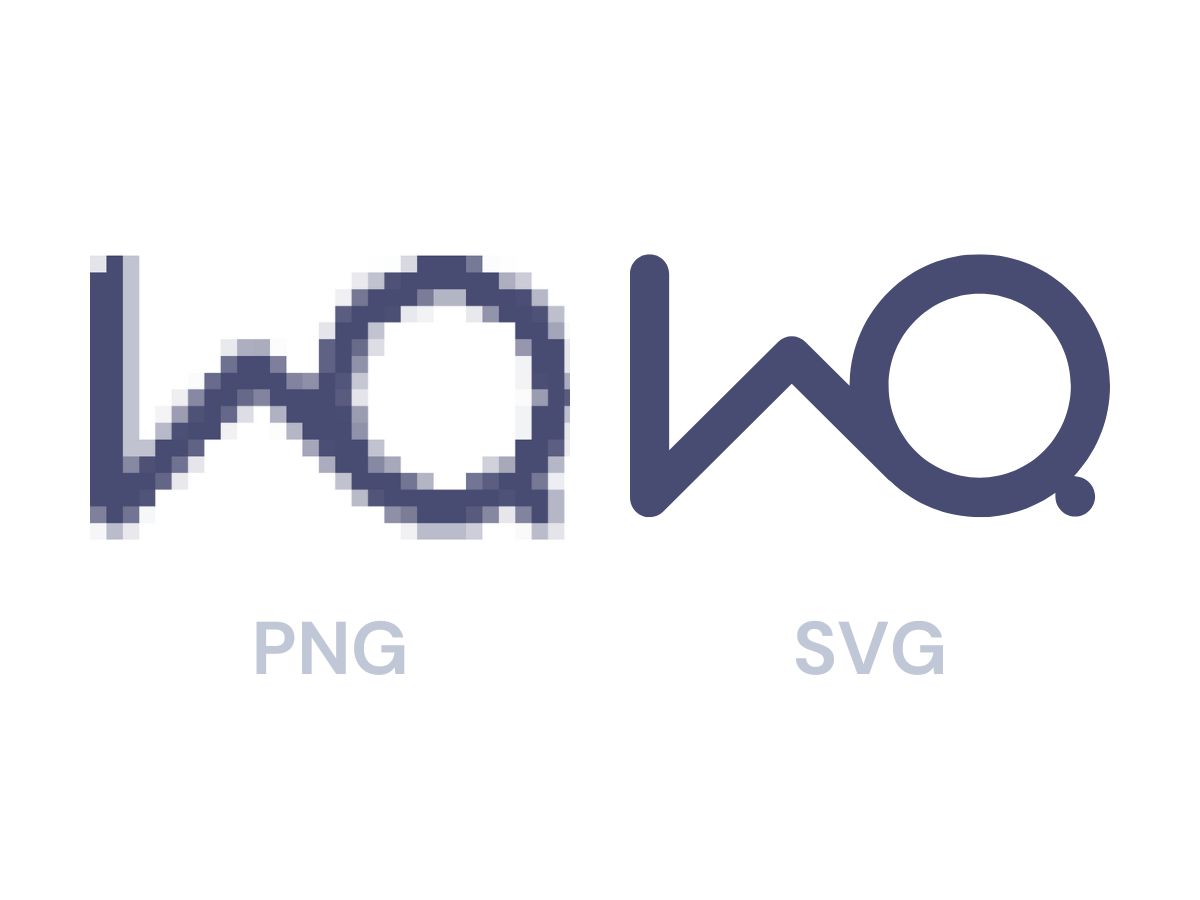
- SVG, PDF and EPS offer scalability without quality loss. PNGs and JPGs can pixelate when enlarged.
Editable:
- Only the original source file (like AI) is truly editable. PDF and EPS may or may not be, depending on how they were saved.
Choosing the right logo format ensures your brand looks professional, consistent, and high-quality across all platforms. Keep these considerations in mind as you grow your business, and don't miss my downloadable cheat sheet to simplify your logo file decisions.
One format is rarely enough on its own either, which is why brands need multiple logo versions. And if you're constantly hunting for a logo file that doesn't look blurry, it can be one of the signs you need a brand refresh.

FREE LOGO FILE FORMAT CHEAT SHEET
Click here to get my logo file cheat sheet to help you choose the right format for your brand every time.
What is the best logo file format for my website?
SVG is the best logo format for most websites. It's a vector file, so it stays sharp at any size on any screen, the file size is tiny and it supports transparency. Keep a PNG version as a backup for places that don't accept SVG. Avoid JPG for logos online, as it has no transparency and loses quality through compression.
Which logo file format should I send to a printer?
Send a PDF for most print jobs. Exported from your original design file, it's vector-based, so your logo can be scaled up for large prints, signage or merchandise without losing quality. Some printers prefer SVG or AI files, and a few older workflows still ask for EPS, so check with your printer and only send EPS if they request it.
What is the difference between a vector and a raster logo file?
Vector files such as SVG, PDF and EPS store your logo as shapes, so they scale to any size without losing quality. Raster files such as PNG and JPG are made of pixels, so they can look blurry or pixelated when enlarged. Use vector versions for print and your website, and PNGs for everyday use like documents and social media.


.webp)