.png)
Webflow vs Squarespace vs WordPress for Service Businesses
Webflow, Squarespace or WordPress? An honest comparison for service businesses on speed, SEO, flexibility, upkeep and real cost, bias and all.
For most growing service businesses, Webflow is the strongest choice for design flexibility, page speed and SEO control. Squarespace suits early-stage businesses that need to launch quickly and update content easily. WordPress is flexible, but hosting, plugins, security and maintenance add real ongoing cost and upkeep for a business without technical support.
I should say upfront that the custom websites I deliver for clients are built on Webflow, so I have a clear point of view on this question. That bias is worth naming before you read any further, the same way I would want to know it if I were reading someone else's comparison.
With that said, the comparison itself is genuinely useful, because the right platform depends heavily on where your business actually is and what you need the site to do. This post gives a fair account of where each platform wins, where it falls short, and which one makes the most sense for a growing service business specifically.
What Actually Matters for a Service Business Website
Before comparing platforms, it helps to be clear on what a service business website actually needs to do well. It needs to load quickly, because page speed affects both user experience and search ranking. It needs enough design flexibility to communicate a specific brand rather than a generic template look. It needs solid technical SEO control, because organic search is one of the most reliable long-term lead sources for a service business. And it needs to be manageable without requiring a developer for every small change.
Different platforms make different trade-offs across those four things, and the right choice depends on which trade-offs matter most for your situation.
Webflow: Where It Wins
Webflow gives genuine design control. You are not filling in a template. You are working with real design properties, margins, breakpoints, and interactions, visually, without writing code, but with the output quality of a hand-coded site.
Performance is a consistent strength. Webflow generates lean, semantic code without plugin bloat, and sites are served through a global content delivery network with automatic image optimisation. In my experience, a well-built Webflow site scores well on Core Web Vitals (Google's measures of loading speed, responsiveness and visual stability) without much fiddling. Those measures feed into Google's page experience signals. Speed will not outrank genuinely better content, but a slow site makes every other part of your SEO work harder.
Technical SEO control is comprehensive. Per-page meta titles and descriptions, custom URL structures and 301 redirects, canonical tags, an automatically generated sitemap, and room to add schema markup through custom code and CMS fields. Webflow has also been adding AI features to the platform, but check what is actually included on your plan rather than taking any comparison post's word for it, mine included. For a service business relying on organic search and AEO visibility, this depth of control matters.
The content management system is also genuinely strong for a growing content strategy. Webflow's Collections let you define custom content types, a blog, a case study library, a team directory, each with its own structure and template, which scales cleanly as a content library grows.
Where Webflow falls short
The learning curve is real. Making small content edits requires some comfort with how the design is structured, which is a genuine barrier for a business owner who wants to make quick changes without calling their designer. And while Webflow's pricing for the platform itself is reasonable, building a genuinely custom site requires design skill, which usually means working with someone like me rather than doing it entirely yourself.
The learning curve is also exactly why I offer Site Success Plans: ongoing Webflow maintenance plus SEO and AEO care, so you are not stuck learning the Designer just to update a service page or add a new case study.
Curious whether Webflow is the right fit for your specific situation?
Book a 30-minute call with me. It is not a pitch. We can talk through what your business actually needs from a website and whether a custom Webflow build makes sense for you right now.
Not sure what your website is actually costing you?
Four Questions. Two minutes
Squarespace: Where It Wins
Squarespace's biggest genuine advantage is ease of use. It is built so a non-technical business owner can make day-to-day content edits confidently without breaking anything. For a business that wants real independence from a designer for routine updates, this matters a great deal.
It is also a coherent all-in-one package. Hosting, SSL, templates, and a reasonable level of built-in SEO and ecommerce capability are bundled into one predictable monthly cost, with no plugins to manage and no separate security concerns to think about.
Squarespace also handles the basics that search engines and AI answer tools look for, such as editable page titles and descriptions, mobile-friendly layouts and SSL, without you needing to configure much. For an early-stage business, that is a sensible baseline.
Where Squarespace falls short
The trade-off for that ease of use is a real ceiling on design flexibility. Squarespace enforces a framework. You can customise within it, but you cannot fully escape it without injected custom code, and at that point you are fighting the platform rather than using it as intended. Performance is fine for most small sites, but in my experience it is harder to get Squarespace pages as lean and fast as a well-built Webflow site, because you have much less control over the code the platform outputs. And the technical SEO controls, while solid for fundamentals, are noticeably shallower than Webflow's once a business wants more advanced control.
WordPress: Where It Wins
WordPress remains the most flexible platform in raw terms. Its plugin ecosystem means there is almost always a way to add a specific feature, however niche, and for businesses with large content libraries or complex functionality requirements, that flexibility can be genuinely valuable.
For businesses already invested in the WordPress ecosystem, with existing content, familiarity, or a developer relationship already in place, switching platforms may cost more than it is worth.
Where WordPress falls short
The honest comparison most agencies avoid making is the total cost of ownership. WordPress itself is free, but in my experience a site that performs well and stays secure can easily run to a few hundred dollars a month once quality hosting, premium plugins, security tools, and developer maintenance are accounted for. That is often a higher real cost than the all-inclusive pricing of Webflow or Squarespace. (I break down what a service business website really costs in Australia in a separate post.)
Security is the other significant factor. Most of the WordPress security problems I have seen clients deal with came from out-of-date or abandoned plugins rather than WordPress itself, and WordPress security companies regularly report the same pattern. That means the platform's greatest strength, its plugin ecosystem, is also its greatest ongoing risk. For a service business without dedicated technical support, this is a meaningful and ongoing burden rather than a one-time setup cost.
The Comparison at a Glance
Here is the short version, side by side.
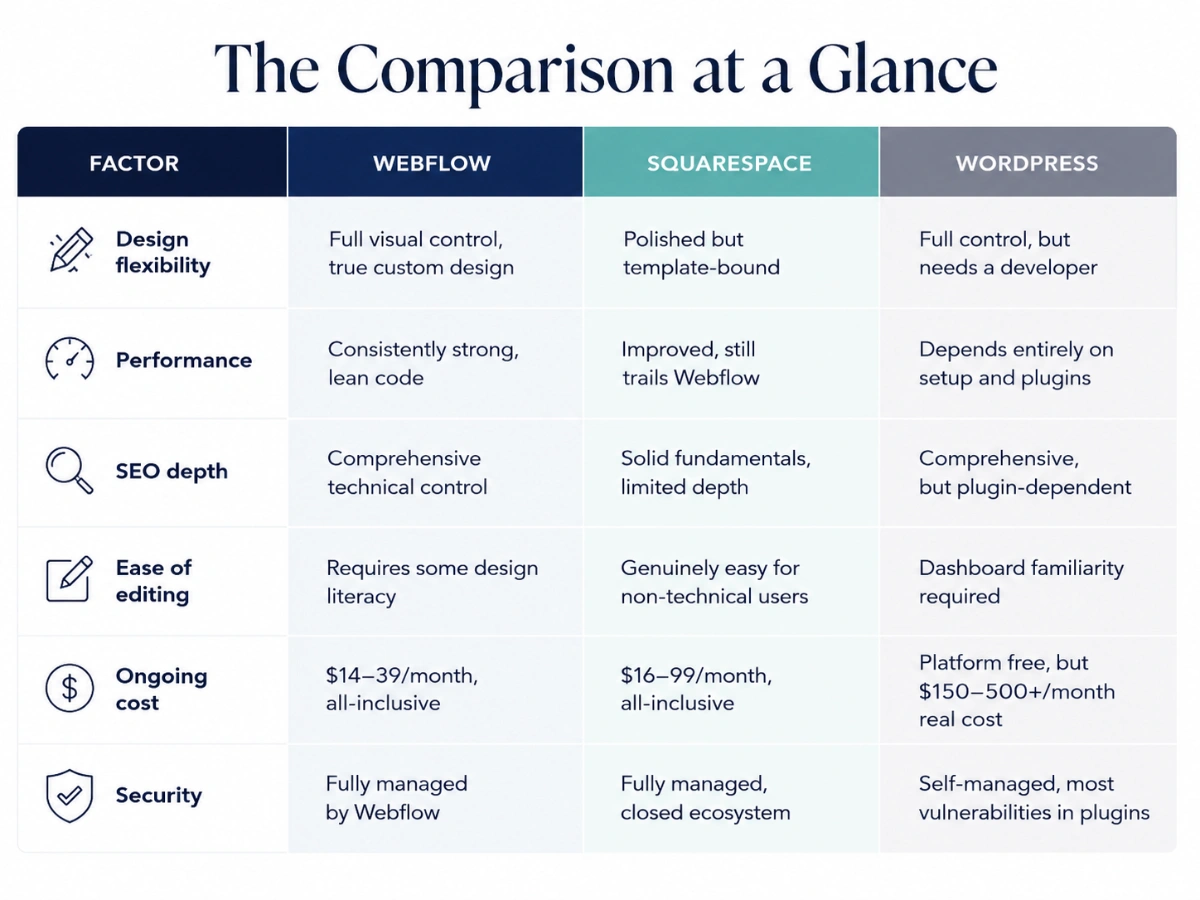
- Webflow: strongest design control, speed and technical SEO. Steeper learning curve, and a custom build usually needs a professional.
- Squarespace: easiest to run yourself, one predictable monthly cost. Limited design flexibility and shallower SEO controls.
- WordPress: most flexible through plugins. Highest ongoing maintenance, security and real cost.
Which Is Better for a Service Business: Webflow, Squarespace, or WordPress?
For most service businesses, Webflow offers the strongest combination of design flexibility, page speed, and SEO control without the ongoing security burden of WordPress. Squarespace is a reasonable choice for an early-stage business that needs to launch quickly and manage the site without design experience. WordPress makes sense mainly when a business needs a specific plugin or content volume that the other two cannot support, and is willing to manage ongoing security and maintenance.
My Honest Recommendation
If you are an early-stage service business that needs to get online quickly, has a tight budget, and is comfortable managing your own content within a template framework, Squarespace is a reasonable and genuinely defensible choice. It will serve you well at that stage.
If you have existing WordPress infrastructure, a developer relationship, or a specific plugin-dependent need that nothing else can replicate, staying on WordPress can make sense, provided you are accounting honestly for the ongoing maintenance cost rather than just the platform's free price tag.
For most growing service businesses ready to invest properly in a brand and web presence that holds a premium rate, converts deliberately, and performs well in both search and AI-driven answer tools, Webflow is where I land, and it is why the sites I deliver are built there. The design control means the site can actually express a specific brand rather than approximate one. The performance and SEO depth mean the investment compounds in search over time rather than plateauing against a platform ceiling.
That is my honest view, bias and all. The right platform for you depends on where your business actually is, not on which platform sounds the most impressive in a sales conversation.
Is Webflow better than Squarespace for a service business?
For most growing service businesses, Webflow offers stronger design flexibility, page speed and SEO control. Squarespace wins on ease of use and is a reasonable choice for an early-stage business that needs to launch quickly and manage content without design experience. The trade-off is that Squarespace has a real ceiling on design flexibility and shallower technical SEO controls.
Is WordPress really free?
WordPress itself is free, but in my experience a site that performs well and stays secure can easily cost a few hundred dollars a month once quality hosting, plugins, security tools and developer maintenance are included. Most WordPress security problems also come from out-of-date plugins, which makes ongoing maintenance a real burden for a service business without dedicated technical support.
When does WordPress make sense for a service business?
WordPress makes sense when you already have existing WordPress infrastructure, a developer relationship or a specific plugin-dependent need that nothing else can replicate. Its plugin ecosystem makes it the most flexible platform in raw terms. Just account honestly for the ongoing security and maintenance cost rather than relying on the platform's free price tag.