.png)
Why Is My Website Not Getting Enquiries? A Five-Minute Diagnostic
Website live for a while but enquiries are not coming in? Use this four-step, five-minute diagnostic to find exactly where the problem is hiding.

A website usually gets no enquiries for one of four reasons. Visitors aren't arriving, the homepage doesn't explain who you serve within five seconds, there's no obvious next step, or the contact process itself is broken. Check those four in order and you'll usually find the problem in about five minutes.
If your website has been live for a while and the enquiries are not coming, or have slowed to almost nothing, you do not need a long explanation right now. You need to find the specific point of failure quickly.
This post is a fast, practical diagnostic. Four areas, checked in order, each one ruling out a specific category of problem before moving to the next. Most websites with zero or near-zero enquiries have a clear answer hiding in one of these four places.
Step One: Confirm People Are Actually Arriving
Before assuming the website itself is the problem, rule out the simpler explanation: nobody is visiting it.
Open Google Analytics or your hosting platform's traffic data and check how many visitors the site received in the last 30 days. If the number is genuinely tiny, in the single or low double digits, the problem is not conversion. It is visibility. No amount of homepage rewriting fixes a site nobody is finding.
If traffic looks reasonable, often anything above a few hundred monthly visitors for a typical service business, the problem is downstream of arrival, and the remaining steps will help locate it.
Step Two: Check the Five-Second Test on Your Homepage
Open your homepage in a private browser window, so you are seeing it the way a stranger would. Look at it for five seconds, then look away and ask yourself honestly: could I say clearly who this business serves and what it does for them?
If the answer is genuinely yes, this step is not your problem. If the answer is no, or took longer than five seconds to work out, this is very likely the primary cause. A visitor who cannot quickly understand who you serve and what you do for them does not stay to figure it out further. They leave, and that departure does not show up as an error anywhere. It just shows up as silence.
The fix here is almost always the homepage headline and subheading. They need to name the client and the outcome plainly, not describe the business in general terms.
Want a second opinion on your homepage's five-second test?
Book a 30-minute call with me. We can look at your homepage together and I will point out exactly where it loses clarity.
Step Three: Look for One Clear, Obvious Action
Scroll through your site as if you were a visitor who has just decided you are interested. Count how many different actions you are being asked to consider: book a call, follow on social, join a newsletter, browse three different service pages, download a guide.
If there are more than one or two competing actions, and none of them is visually dominant, that is very likely contributing to the silence. A visitor who is ready to act but faces several equally weighted options often does none of them, simply because no single action felt like the obvious next step.
The fix is to decide on one primary action for the page, make it visually unmistakable, and let everything else recede into a secondary role.
Not sure what your website is actually costing you?
Four Questions. Two minutes
Step Four: Test the Contact Process Itself
This step gets skipped more often than it should, and it is sometimes the entire explanation. Fill in your own contact form right now, using a real but different email address, and submit it.
Does it actually arrive somewhere you check. Does it return an error. Is there a broken integration between your website platform and your email or CRM that has been silently failing for weeks or months. A contact form that quietly stopped working is more common than most business owners expect, particularly after a platform update or a plugin change, and it produces exactly the symptom you are troubleshooting: visitors trying to reach out and apparently disappearing.
If you have a phone number listed, call it. If you have a booking link, click through it to the end. Confirm every contact path actually functions before assuming the problem is something more strategic.
Why Is My Website Not Getting Any Enquiries?
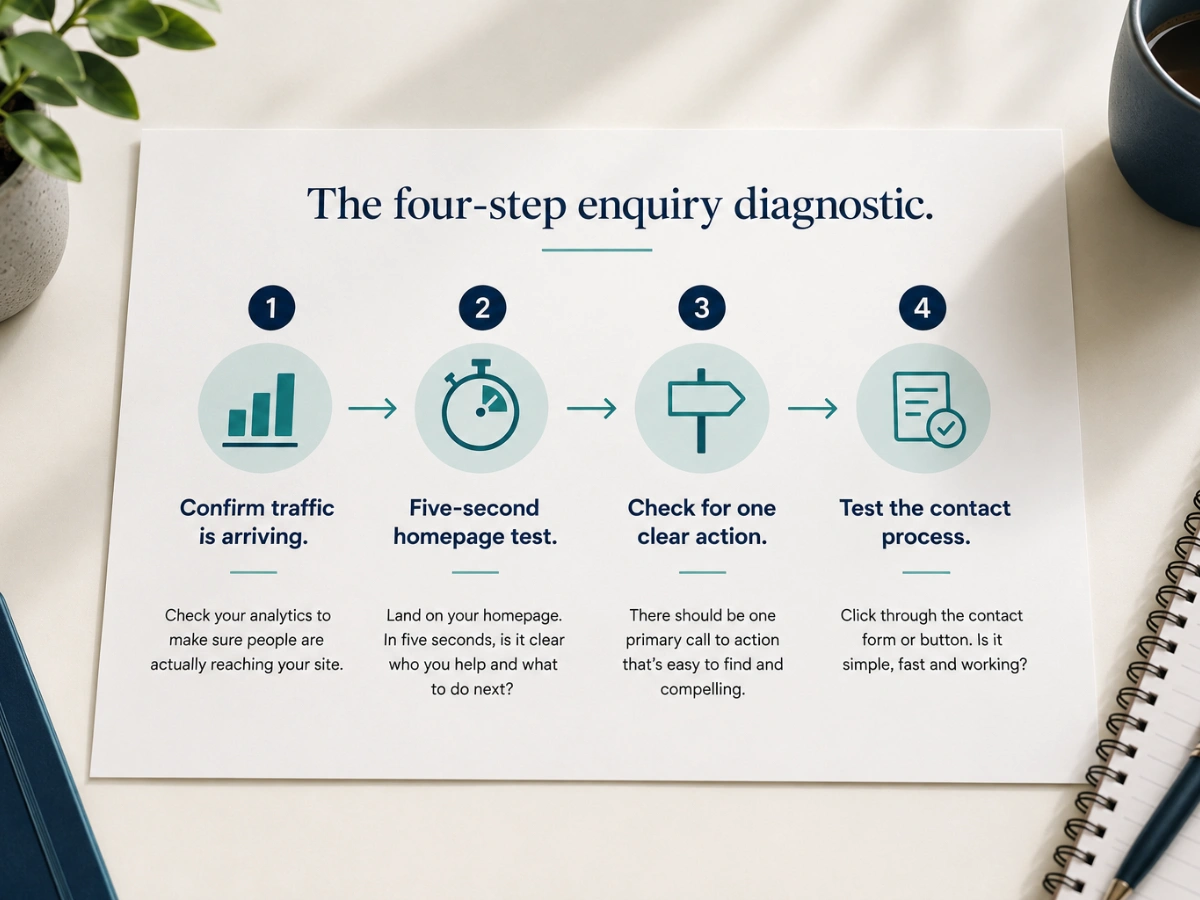
A website usually gets no enquiries for one of four reasons: visitors are not arriving in the first place, the homepage does not clearly explain who you serve within the first few seconds, there is no obvious next step for a ready visitor to take, or the contact process itself has a technical fault. Running through these four areas in order usually identifies the specific point of failure within a few minutes.
Once You Have Found the Likely Cause
This diagnostic is designed to point you towards the right category of problem quickly. What you do next depends on which step revealed the issue.
If the problem is traffic, the website itself may be fine, and the priority is visibility: SEO, local search presence, and content that helps the right people find you in the first place.
If the problem is homepage clarity or messaging, a deeper look at why your website is not converting will help you rebuild the copy and structure properly rather than guessing at a quick fix.
If the problem showed up in more than one step, a fuller read through why visitors leave a website within seconds will help you address the rest systematically rather than one at a time.
This five-minute check will not fix the underlying issue on its own. What it does is save you from spending time and money on the wrong fix, by telling you with reasonable confidence which part of the system actually needs attention.
Why is my website not getting any enquiries?
A website usually gets no enquiries for one of four reasons: visitors aren't arriving in the first place, the homepage doesn't clearly explain who you serve within the first few seconds, there's no obvious next step for a ready visitor, or the contact process itself has a technical fault. Checking these four areas in order usually finds the problem within a few minutes.
What is the five-second test for a homepage?
Open your homepage in a private browser window so you see it the way a stranger would. Look at it for five seconds, then look away and ask whether you could clearly say who the business serves and what it does for them. If not, the homepage headline and subheading need to name the client and the outcome plainly.
How do I check if my website contact form is working?
Fill in your own contact form using a real but different email address and submit it. Check that it arrives somewhere you actually look and doesn't return an error. If you list a phone number, call it, and click through any booking link to the end. Broken forms are more common than most owners expect, especially after a platform update or plugin change.